
You use it every single day probably without thinking about it.
When you stream a show on Netflix, share a file on Google Drive, or join a Zoom meeting from your living room, you’re using cloud computing. It’s behind almost everything that runs on the internet today. Yet most people still have no clear picture of what it actually is or why it matters so much.
That’s a problem because whether you’re a student, a small business owner, or someone just trying to understand the tech world, cloud computing affects you directly. Understanding it helps you make smarter decisions, avoid unnecessary costs, and keep up with a world that’s moving fast.
In this guide, you’ll learn exactly what cloud computing is, how it works, the different types, the real benefits, and the honest downsides. No jargon. No fluff. Just a clear, practical breakdown.
Cloud computing is the delivery of computing services, including storage, software, servers, databases, and networking, over the internet instead of running them on a local computer or on-site server. It lets individuals and businesses access and use technology on demand, paying only for what they use, without managing physical hardware themselves.
Quick Summary
Cloud computing means using the internet to access computing power, storage, and software instead of relying on your own hardware. It’s flexible, cost-effective, and used by everyone from solo users to Fortune 500 companies. The main benefits include lower costs, scalability, remote access, and automatic updates with some real trade-offs around internet dependency and data privacy.
How Cloud Computing Actually Works
Think of cloud computing like electricity. You don’t build your own power plant you just plug in and pay for what you use. Cloud computing works the same way.
Large technology companies called cloud providers build and maintain massive data centers filled with powerful servers. These providers rent out access to those servers, storage systems, and software tools over the internet.
When you upload a photo to iCloud or save a document to Google Docs, that file isn’t sitting on your device. It’s stored on a remote server managed by Apple or Google that you can access from anywhere with an internet connection.
On the business side, a company in New York City can run its entire IT infrastructure on servers physically located in Virginia or Oregon without owning a single piece of hardware. That’s the practical reality of cloud computing today.
The Three Main Types of Cloud Computing
Not all cloud computing is the same. There are three main service models, and each one serves a different purpose.
Infrastructure as a Service (IaaS)
This is the most basic level. The cloud provider gives you raw computing power, servers, storage, and networking, and you build whatever you need on top of it.
Example: Amazon Web Services (AWS) EC2 lets developers rent virtual servers by the hour to run applications or websites.
Best for: Developers, IT teams, and businesses that want full control over their setup.
Platform as a Service (PaaS)
Here, the provider gives you a ready-to-use environment to build and deploy applications. You don’t manage the underlying infrastructure just your code and data.
Example: Google App Engine lets developers build and host web apps without worrying about servers or updates.
Best for: Software developers who want to build without handling IT overhead.
Software as a Service (SaaS)
This is the one most people use without realizing it. The provider delivers a complete, ready-to-use software application over the internet.
Example: Gmail, Slack, Salesforce, Microsoft 365, Dropbox all SaaS products.
Best for: Everyone. No installation, no maintenance, no updates to manage.
Public, Private, and Hybrid Cloud – What’s the Difference?
Beyond service types, cloud computing also breaks down by deployment model.
| Deployment Model | Who Manages It | Best For | Example |
|---|---|---|---|
| Public Cloud | Third-party provider | Startups, individuals, SMBs | AWS, Google Cloud, Microsoft Azure |
| Private Cloud | The organization itself | Banks, healthcare, government | On-site data centers with cloud tools |
| Hybrid Cloud | Both – combined approach | Enterprises needing flexibility | A business using AWS + private servers |
Most large organizations today use a hybrid model keeping sensitive data on private servers while using public cloud for everyday workloads.
The Real Benefits of Cloud Computing
This is where cloud computing earns its reputation. Here’s what it actually delivers.
Cost Savings – You Pay for What You Use
Traditional IT requires buying hardware, hiring staff to manage it, paying for maintenance, and replacing equipment every few years. Those costs add up fast.
With cloud computing, there’s no large upfront investment. You pay a monthly or usage-based fee much like a subscription. For a small business in Chicago running on Microsoft Azure, that might mean spending $300 a month instead of $30,000 on hardware.
This shift from capital expenditure to operating expenditure is a big deal for businesses of every size.
Scalability – Grow Without Friction
One of the strongest advantages of cloud computing is how easily it scales. Need more storage? More processing power? More user seats? You adjust your plan often in minutes.
Compare that to traditional infrastructure, where buying and setting up new servers could take weeks.
A great example: during the COVID-19 pandemic, Zoom scaled from 10 million daily users in December 2019 to over 300 million by April 2020. That kind of explosive growth would be impossible without cloud infrastructure.
Remote Access – Work From Anywhere
Cloud computing made remote work practical. Your files, tools, and systems live on the internet not on one office computer. That means your team can work from home, from a coffee shop, or from another country without missing a beat.
This isn’t just convenient. For businesses, it opens up a global talent pool and reduces dependency on physical office space.
Automatic Updates and Maintenance
When you use a cloud-based tool, updates happen automatically in the background. No IT team needed. No downtime scheduled. No version conflicts.
Microsoft 365, for example, rolls out security patches and new features without users having to do anything. That’s one less thing to manage.
Disaster Recovery and Data Backup
Losing business data to a hard drive failure or office fire used to be catastrophic. Cloud computing changes that.
Most cloud providers automatically back up your data across multiple locations. If one server fails, another takes over instantly. For businesses, this dramatically reduces the risk of permanent data loss.
Security – Better Than Most People Expect
This surprises a lot of people. The common assumption is that the cloud is less secure than storing data locally. In many cases, the opposite is true.
Major cloud providers like AWS, Google Cloud, and Microsoft Azure invest billions of dollars in cybersecurity infrastructure, encryption, and compliance certifications that most small or mid-sized businesses simply can’t match on their own.
That said, security in the cloud is a shared responsibility. The provider secures the infrastructure but you’re still responsible for how you use it and who has access.
Honest Downsides Worth Knowing
Cloud computing is powerful, but it’s not perfect.
Internet dependency is the biggest one. If your connection goes down, so does your access to cloud tools. For businesses in areas with unreliable connectivity, this is a real problem.
Ongoing costs can add up. If you’re running heavy workloads 24/7, a pay-as-you-go model can sometimes end up costing more than owning hardware outright. Always compare before committing.
Data privacy concerns are legitimate. When data sits on a third-party server, questions about who can access it and under what legal circumstances are fair to ask. Always read the provider’s data policy carefully.
Vendor lock-in is another risk. If you build your entire system around one cloud provider’s tools, switching later can be painful and expensive.
None of these are dealbreakers. But they’re worth factoring into any decision.
Who Uses Cloud Computing Today?
The short answer: almost everyone.
- Individuals use it through apps like Spotify, iCloud, Gmail, and Google Maps
- Small businesses use it for accounting software, email, and file storage
- Enterprises use it to run databases, power global applications, and enable remote teams
- Healthcare systems use it to store patient records and share data securely across facilities
- Government agencies use it for data management and citizen-facing services
In 2024, the global cloud computing market was valued at over $680 billion and it continues to grow rapidly.
Cloud Computing and Everyday Technology
If you’ve ever asked Siri a question, streamed music on Spotify, or used a navigation app, you’ve interacted with cloud infrastructure. These services don’t run on your phone; they pull data from remote servers and deliver it to you in real time.
Artificial intelligence tools, machine learning platforms, and big data analytics all depend on cloud computing as their foundation. Without it, none of these modern technologies could operate at scale.
Understanding cloud computing also helps you follow bigger trends like edge computing, serverless architecture, and multi-cloud strategies, all of which are building on the same foundation.
If you want to understand where digital technology is heading, start by understanding the cloud. Everything else connects back to it.
Frequently Asked Questions
What is cloud computing in simple terms?
Cloud computing means accessing storage, software, and processing power over the internet instead of relying on your own hardware. You access everything through a browser or app, from any device, anywhere no local servers or installations needed.
What are the main benefits of cloud computing?
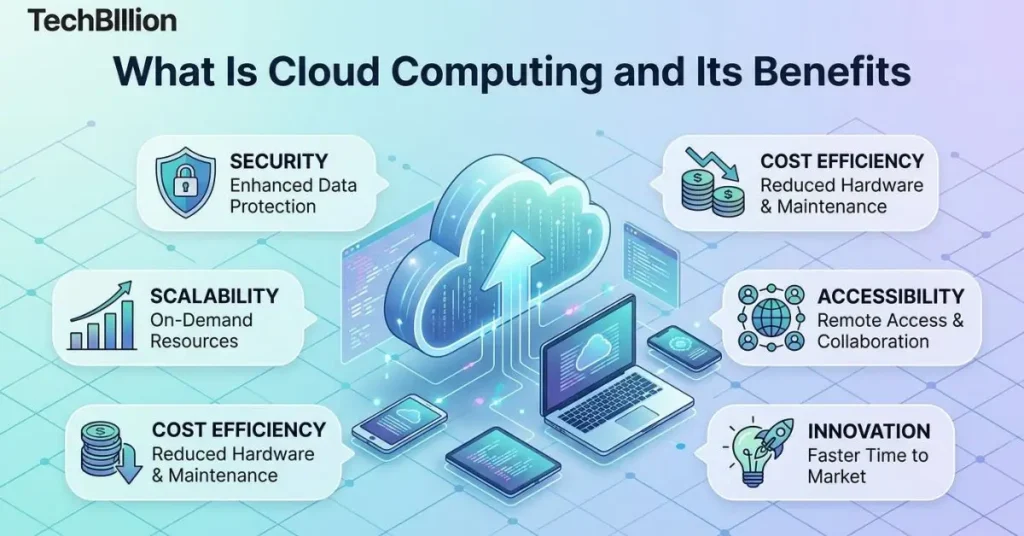
The main benefits include lower costs, easy scalability, remote access, automatic updates, and built-in data backup. Businesses especially value the ability to scale resources instantly without investing in physical hardware.
Is cloud computing safe?
Yes, major providers invest heavily in encryption and security certifications. However, security is a shared responsibility. Providers protect the infrastructure, but users must manage access controls and follow basic practices like two-factor authentication.
What are the three types of cloud computing?
The three types are IaaS (raw infrastructure), PaaS (development environments), and SaaS (ready-to-use software). Most everyday users interact with SaaS tools like Gmail, Dropbox, and Zoom are common examples.
What is an example of cloud computing in everyday life?
Streaming Netflix, using Gmail, saving photos to Google Photos, or syncing files through iCloud are all everyday cloud computing examples. These services run on remote servers and deliver results to your device in real time.
How is cloud computing different from traditional computing?
Traditional computing uses local hardware you own and manage. Cloud computing moves everything online a provider handles the infrastructure, and you simply pay for access, usually through a monthly subscription or usage-based plan.